
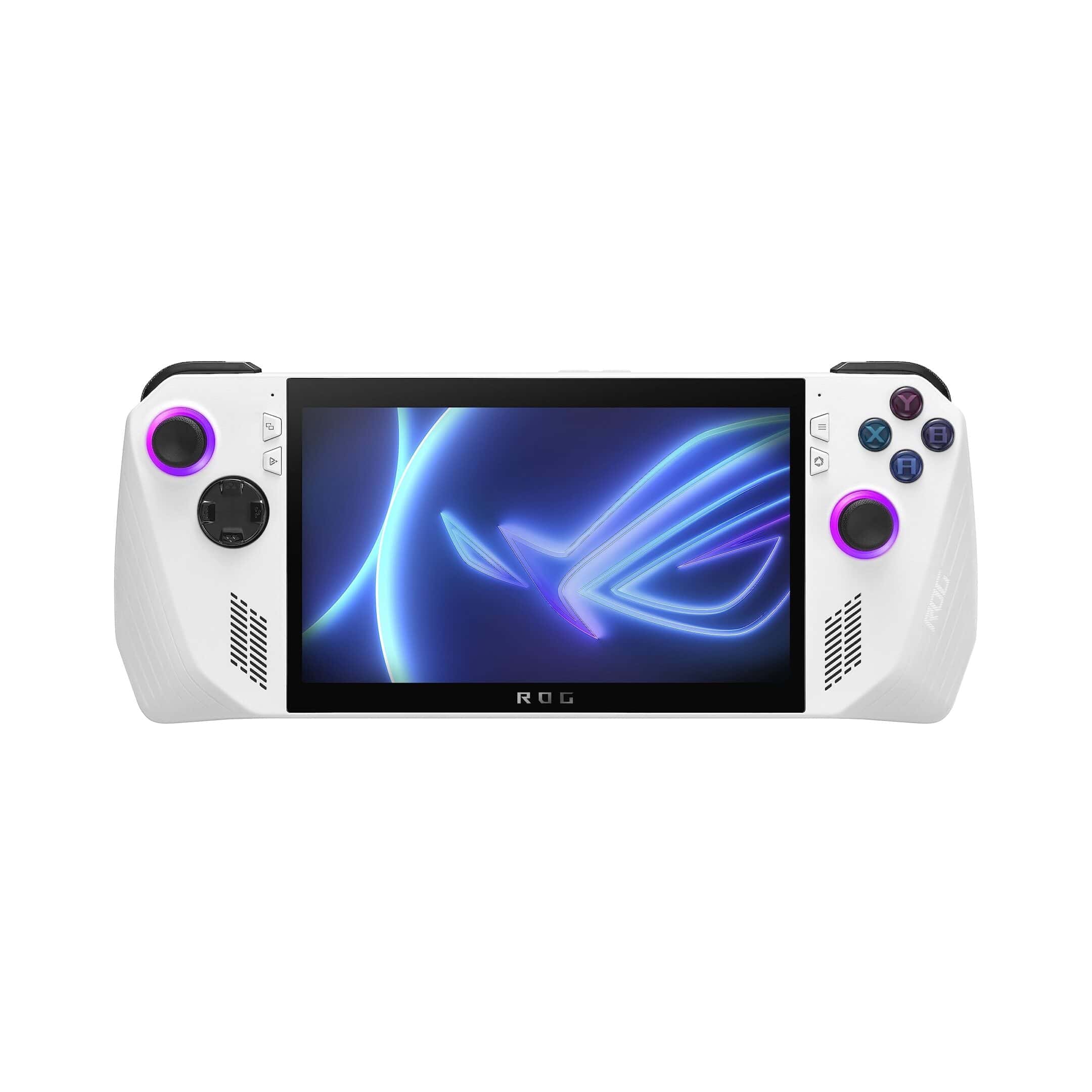
The handheld PC gaming market has heated up with two major contenders battling for supremacy: Valve’s Steam Deck and Asus’ ROG Ally. While both devices aim to bring PC gaming on the go, they offer different strengths that might appeal to different types of gamers. The Steam Deck provides significantly better battery life, lasting at least two hours on most games compared to the ROG Ally’s shorter duration.
The ROG Ally edges out the Steam Deck in raw performance, featuring more powerful hardware and a beautiful 1080p display for enhanced visual fidelity. However, this performance boost comes at a cost, as battery tests show the Steam Deck OLED lasting about an hour and a half while the ROG Ally X managed just over two hours. The hardware differences extend beyond just performance, with each device offering unique features that cater to different gaming preferences.
The comparison isn’t just about hardware specifications. The Steam Deck has been described as the “Nintendo Switch of PC gaming handhelds,” suggesting it offers a more accessible and streamlined experience. Meanwhile, the ROG Ally provides greater compatibility with various gaming platforms, including Xbox Game Pass, giving users more options for how they access their game libraries.
Steam Deck vs ROG Ally: 2026 Performance Comparison
The handheld gaming PC market has evolved significantly since the Steam Deck launched in 2022. By 2026, both Valve’s Steam Deck and ASUS’s ROG Ally lines have matured into compelling options for portable gaming. This comprehensive comparison examines the current generation of devices to help you choose the right handheld for your needs.
Current Generation Overview
As of December 2024 (with projections for 2026), the handheld gaming landscape features:
- Steam Deck: Available in LCD and OLED variants, powered by custom AMD APU
- ROG Ally: Two models with Ryzen Z1 and Z1 Extreme processors
- ROG Ally X: Enhanced version with improved battery and RAM (launched 2024)
Specifications Comparison Table
| Feature | Steam Deck (OLED) | ROG Ally (Z1 Extreme) | ROG Ally X |
|---|---|---|---|
| Processor | Custom AMD APU (Zen 2, 4-core) | AMD Ryzen Z1 Extreme (Zen 4, 8-core) | AMD Ryzen Z1 Extreme (Zen 4, 8-core) |
| GPU | RDNA 2, 8 CUs | RDNA 3, 12 CUs | RDNA 3, 12 CUs |
| RAM | 16GB LPDDR5 | 16GB LPDDR5 | 24GB LPDDR5X-7500 |
| Display | 7.4″ OLED, 1280×800, 90Hz | 7″ IPS LCD, 1920×1080, 120Hz | 7″ IPS LCD, 1920×1080, 120Hz |
| Storage | 512GB / 1TB NVMe | 512GB NVMe | 1TB NVMe (upgradeable) |
| Battery | 50Whr | 40Whr | 80Whr |
| Battery Life | 3-12 hours (game dependent) | 1.5-3 hours gaming | 3-8 hours gaming |
| Weight | 640g (1.41 lbs) | 608g (1.34 lbs) | 678g (1.49 lbs) |
| Operating System | SteamOS 3 (Linux-based) | Windows 11 | Windows 11 |
| Price (2024) | $549 / $649 | $649 | $799 |
| TDP Range | 4-15W | 9-30W | 9-30W |
| Expandable Storage | microSD (UHS-I) | microSD (UHS-II) | microSD (UHS-II) |
| Ports | USB-C, headphone jack | USB-C, ROG XG Mobile, microSD | USB-C (2x), ROG XG Mobile, microSD |
| VRR Support | Yes (48-90Hz) | Yes (48-120Hz) | Yes (48-120Hz) |
(sources: Tom’s Guide, Digital Trends, PCMag)
Performance Benchmarks
Raw Processing Power
Winner: ROG Ally / ROG Ally X
The ROG Ally’s Ryzen Z1 Extreme processor delivers significantly more raw performance:
- 30-50% higher CPU performance in multi-threaded workloads
- Zen 4 architecture vs Steam Deck’s Zen 2
- 12 RDNA 3 compute units vs 8 RDNA 2 units
- Higher clock speeds: Up to 5.1GHz boost vs 3.5GHz
This translates to:
- Better performance in CPU-intensive games
- Smoother multitasking
- Better emulation performance for demanding systems
- Future-proofing for upcoming titles
(source: TechRadar)
Gaming Performance at Native Resolution
Steam Deck (800p):
- Consistently hits 40-60 FPS in most modern games at medium-high settings
- Well-optimized for its native 1280×800 resolution
- Lower resolution means less GPU strain
- Games look sharp on the smaller OLED panel
ROG Ally (1080p):
- Can achieve 60+ FPS in many games at native resolution
- Higher resolution requires more GPU power
- Often needs settings reduced to medium for 60 FPS
- Benefits from resolution scaling options
Real-world gaming examples:
| Game | Steam Deck (800p) | ROG Ally (1080p) | ROG Ally (720p) |
|---|---|---|---|
| Cyberpunk 2077 | 30-40 FPS (Medium) | 35-45 FPS (Medium) | 50-60 FPS (High) |
| Elden Ring | 40-50 FPS (High) | 55-60 FPS (High) | 60 FPS (Ultra) |
| Spider-Man Remastered | 40 FPS (High) | 50-60 FPS (High) | 60+ FPS (Very High) |
| Baldur’s Gate 3 | 30-40 FPS (Medium) | 40-50 FPS (Medium) | 55-60 FPS (High) |
| Red Dead Redemption 2 | 30-35 FPS (Medium) | 40-45 FPS (Medium) | 50-55 FPS (High) |
(source: Digital Trends)
Battery Life Performance
Winner: Steam Deck OLED (standard gaming) / ROG Ally X (intensive gaming)
Steam Deck OLED:
- 50Whr battery with efficient 15W max TDP
- 3-5 hours for demanding AAA games
- 6-8 hours for indie games
- 8-12 hours for older or less demanding titles
- Exceptional efficiency due to lower resolution
ROG Ally (original):
- 40Whr battery with 30W max TDP
- 1.5-2 hours for AAA games at full power
- 2-3 hours with TDP limited to 15W
- Frequently criticized for poor battery life
- Often requires portable charger for extended sessions
ROG Ally X:
- 80Whr battery (double the original Ally)
- 3-4 hours for demanding AAA games
- 5-8 hours for less intensive games
- Matches or exceeds Steam Deck in many scenarios
- Significantly improved over original Ally
Battery efficiency ranking:
- Steam Deck OLED (best efficiency per watt)
- ROG Ally X (best absolute battery capacity)
- Steam Deck LCD
- ROG Ally (original, poorest battery life)
(source: Tom’s Guide)
Thermal Management
Steam Deck:
- More conservative thermal design
- Stays cooler during extended play
- Quieter fan noise at typical gaming loads
- Maximum 15W TDP prevents excessive heat
- Better for lap gaming or handheld use
ROG Ally / Ally X:
- More aggressive cooling required
- Can get noticeably warm at 25-30W TDP
- Louder fan noise at higher performance modes
- Three performance modes: Silent (9W), Performance (15W), Turbo (25-30W)
- Better suited for docked/tabletop gaming at high TDP
Display Quality Comparison
Steam Deck OLED – Winner for Visual Quality:
- OLED technology: True blacks, infinite contrast
- 90Hz refresh rate: Smooth gameplay
- HDR support: Enhanced color vibrancy
- Larger screen: 7.4″ vs 7″
- Perfect for dark games: Incredible contrast in atmospheric titles
- Lower resolution: 1280×800, but looks sharp due to OLED quality
ROG Ally / Ally X – Winner for Sharpness:
- 1080p resolution: Noticeably sharper text and UI elements
- 120Hz refresh rate: Smoother in games that can hit high framerates
- IPS LCD: Good color accuracy but no true blacks
- VRR support: Variable refresh rate reduces tearing
- Better for Windows desktop use: Higher resolution helps with small text
Display winner depends on priorities:
- Prefer visual fidelity and HDR: Steam Deck OLED
- Prefer sharpness and high refresh: ROG Ally
(source: Digital Trends)
Operating System and Software
SteamOS vs Windows 11
Steam Deck’s SteamOS:
Advantages:
- Purpose-built for handheld gaming
- Seamless Steam integration
- Better power efficiency
- Proton compatibility layer runs most Windows games
- Free and open-source
- No Windows licensing costs
- Regular Valve updates
- Better controller-first interface
Limitations:
- Some games don’t work (anti-cheat issues)
- No native Xbox Game Pass
- Cannot run Windows-only software
- Smaller verified game library
ROG Ally’s Windows 11:
Advantages:
- Runs every PC game natively
- Full Xbox Game Pass support
- Access to any Windows software
- Better emulation compatibility
- Epic Games Store, GOG, etc. all work
- More flexible for non-gaming tasks
Limitations:
- Windows not optimized for handheld use
- Poorer battery efficiency
- More complex setup for gaming
- Armory Crate SE interface can be buggy
- Windows updates can disrupt gaming
- Requires anti-virus and maintenance
Winner: Depends on use case
- Pure Steam gaming: Steam Deck
- Game Pass + variety: ROG Ally
Game Compatibility
Steam Deck Game Compatibility (as of late 2024):
According to ProtonDB and Valve’s verification:
- Verified: 6,000+ games
- Playable: 8,000+ games
- Unsupported/Unknown: Thousands more
- Total playable library: 10,000+ titles
Problem areas:
- Competitive multiplayer with kernel-level anti-cheat (Destiny 2, Valorant, some Call of Duty titles)
- Some EA games with EA App
- Certain Game Pass titles
ROG Ally Game Compatibility:
- Essentially 100% of PC games work
- Full compatibility with all storefronts
- Better emulation support (Windows emulators)
- Can run productivity software
(source: PCMag)
Build Quality and Ergonomics
Design and Comfort
Steam Deck:
- Larger and heavier overall footprint
- More ergonomic grip design
- Better weight distribution
- Trackpads for mouse control and strategy games
- More comfortable for extended handheld sessions
- Premium feel with OLED model
ROG Ally:
- More compact and lighter (original model)
- Xbox-style controller layout
- No trackpads
- Better for traditional controller gamers
- Ally X is slightly heavier but better balanced
- Premium white finish (shows wear more easily)
Key Takeaways
- Steam Deck offers superior battery life while ROG Ally delivers better performance and a higher-quality display.
- Each device features different software ecosystems, with Steam Deck optimized for Steam and ROG Ally offering broader compatibility with services like Xbox Game Pass.
- Your choice between these handheld gaming PCs should depend on your priorities: battery life, performance, or software ecosystem accessibility.
Comparative Analysis of Hardware and Performance
Both the Steam Deck and ROG Ally offer distinct advantages in their hardware configurations, with each device making different compromises to deliver portable gaming experiences. Their differences extend across physical design, display technology, processing capabilities, and battery performance.
Design and Build Quality
The Steam Deck features a more substantial build with ergonomic grips that make extended gaming sessions comfortable. Weighing approximately 669 grams (OLED version), it feels solid but remains heavier than its competitor.
The ROG Ally adopts a lighter design at around 608 grams with a white chassis that stands out visually. Its more traditional controller layout might feel familiar to console gamers, with symmetrically placed joysticks.
Both devices incorporate rear buttons and touchpads, though the Steam Deck offers more input options with its dual touchpads. The Ally’s triggers have a more premium feel with smoother actuation.
Build quality differences are noticeable in the buttons and joysticks, with the Ally featuring slightly more premium-feeling controls but the Steam Deck offering better overall ergonomics for longer play sessions.
Display Characteristics
The Steam Deck OLED represents a significant upgrade with its vibrant 7-inch OLED panel running at 1280×800 resolution with a 90Hz refresh rate. This display delivers deeper blacks, better contrast, and improved outdoor visibility compared to the original LCD model.
The ROG Ally pushes resolution higher with its 7-inch 1920×1080 IPS display running at an impressive 120Hz refresh rate. This higher refresh rate provides smoother motion in fast-paced games when the hardware can push enough frames.
Color accuracy favors the OLED version of the Steam Deck, though the Ally’s higher pixel density results in sharper text and UI elements. The Ally also offers a brighter peak brightness, making it more usable in well-lit environments.
Display Comparison:
| Feature | Steam Deck OLED | ROG Ally |
|---|---|---|
| Panel Type | OLED | IPS LCD |
| Resolution | 1280×800 | 1920×1080 |
| Refresh Rate | 90Hz | 120Hz |
| Touch | Yes | Yes |
Processing Power and Gaming Performance
The Steam Deck utilizes a custom AMD APU with 4 Zen 2 cores and RDNA 2 graphics, while the ROG Ally steps up with a Ryzen Z1 Extreme featuring 8 Zen 4 cores and RDNA 3 graphics.
In raw performance, the ROG Ally consistently delivers higher frame rates in most titles. Testing shows 15-30% better performance in demanding games like Cyberpunk 2077 and Elden Ring when both systems run at similar TDP settings.
The Steam Deck compensates with better software optimization. Many games run remarkably well despite the hardware disadvantage, with SteamOS providing excellent scaling at lower power settings.
Thermal management differs significantly between the devices. The Ally runs hotter but maintains higher performance, while the Steam Deck prioritizes consistent performance and cooler operation over maximum frames.
Memory and Storage Solutions
Both handhelds come equipped with 16GB of RAM, though the ROG Ally uses faster LPDDR5X memory compared to the LPDDR5 in the Steam Deck. This memory speed difference contributes to the Ally’s performance advantage in memory-intensive titles.
For storage, the Steam Deck OLED offers 512GB or 1TB NVMe SSD options with a microSD card slot for expansion. The Ally similarly provides 512GB or 1TB configurations with microSD expansion.
Storage access speeds favor the Ally with faster read/write capabilities:
- ROG Ally: ~5,000MB/s read, ~3,500MB/s write
- Steam Deck: ~3,000MB/s read, ~2,000MB/s write
Both devices allow for storage upgrades, though the Steam Deck’s process is more complex and voids warranty. The Ally’s M.2 2280 slot is more accessible for users comfortable with disassembly.
Battery Life Efficiency
Battery performance shows the most dramatic difference between these handhelds. The Steam Deck consistently delivers 2-6 hours of gameplay depending on settings and game requirements, with the OLED version improving runtime by approximately 30% over the original.
The ROG Ally struggles with power efficiency, typically providing only 1-3 hours of gameplay at similar settings. This significant battery life gap makes the Steam Deck much more practical for extended portable sessions.
Power management options differ as well. The Steam Deck offers more granular control over TDP, framerate limiting, and performance profiles through SteamOS. These tools help users balance performance and battery life effectively.
The Ally’s Windows-based system provides less integrated power management, though third-party tools help bridge this gap. At maximum performance settings, the Ally draws significantly more power—up to 30W compared to the Steam Deck’s 15W cap.
Software Ecosystem and Compatibility
The Steam Deck and ROG Ally offer distinct software experiences that significantly impact how gamers interact with these handheld devices. Their operating systems, game libraries, and connectivity options create very different user experiences despite their similar form factors.
Operating System Differences
The Steam Deck runs on SteamOS, a Linux-based operating system customized by Valve. This open-source foundation gives users more freedom to tinker with their device settings compared to Windows-based handhelds.
The ROG Ally, meanwhile, comes with Windows 11, providing a familiar desktop environment many PC gamers already know. This gives the Ally immediate compatibility with a wide range of Windows applications and games without needing additional compatibility layers.
SteamOS uses Proton, a compatibility layer that allows Windows games to run on Linux. While Proton has improved significantly, some games still perform better natively on Windows.
Users can install Windows on the Steam Deck, though this may affect battery life and requires some technical knowledge to set up properly.
Game Library and Support
The Steam Deck seamlessly integrates with Steam’s massive library, with a growing list of “Deck Verified” games that work perfectly on the device right out of the box.
Deck Verified Status Categories:
- Verified (works perfectly)
- Playable (works with minor adjustments)
- Unsupported (significant issues)
- Unknown (not tested yet)
The ROG Ally has access to multiple game stores including Steam, Epic Games Store, Xbox Game Pass, and more without compatibility concerns. This gives it an edge for gamers who use multiple platforms.
Some anti-cheat systems still cause problems on the Steam Deck. Games like Destiny 2 may not run at all due to compatibility issues with Proton.
User Interface and Gaming Experience
SteamOS features a console-like interface optimized for handheld use. The Steam Deck’s touchpads and customizable control schemes provide flexible input options for games not designed for controllers.
The Windows interface on the ROG Ally can sometimes feel awkward on a small touchscreen. ASUS attempted to address this with their Armoury Crate game launcher, but navigating Windows itself can still be cumbersome.
Both devices allow adjusting settings like TDP (Thermal Design Power) and frame rates to balance performance and battery life. The Steam Deck’s interface makes these adjustments more accessible to casual users.
Game suspend/resume functionality works more consistently on the Steam Deck, creating a more console-like experience.
Connectivity and External Device Support
Both devices feature USB-C ports that support external displays, docks, and peripherals. The ROG Ally has a slight edge with its USB 4.0 port that provides faster data transfer speeds than the Steam Deck’s USB 3.2.
The Steam Deck officially supports docking to use the handheld as a desktop PC. Valve’s official dock is designed specifically for this purpose, ensuring compatibility.
The ROG Ally’s Windows operating system typically recognizes more external devices without requiring special drivers. This makes it easier to connect printers, webcams, and other peripherals.
Both handhelds support Bluetooth for wireless controllers, headphones, and other accessories. Wi-Fi connectivity is also comparable, though the ROG Ally supports the newer Wi-Fi 6E standard.
Frequently Asked Questions
The Steam Deck and ROG Ally represent two distinct approaches to handheld PC gaming, with significant differences in performance, battery life, display technology, and overall gaming experience. These comparisons help gamers decide which device better suits their needs.
What are the performance differences between the Steam Deck and the ROG Ally?
The ROG Ally typically delivers higher performance than the Steam Deck due to its more powerful AMD Ryzen Z1 Extreme processor. This performance edge allows the Ally to run demanding games at higher frame rates and settings.
The Steam Deck utilizes a custom AMD APU that prioritizes efficiency over raw power. This design choice supports better thermal management and battery life.
For most modern AAA games, the ROG Ally can achieve 10-20% higher frame rates at similar graphical settings compared to the Steam Deck.
How does the battery life of the ROG Ally compare to the Steam Deck?
Battery life represents one of the most significant differences between these devices. The Steam Deck consistently delivers superior battery endurance, lasting at least 2 hours on virtually any game from a full charge.
The ROG Ally tends to drain more quickly, especially when running at maximum performance. This difference becomes even more pronounced with graphically intensive titles.
The Steam Deck OLED model further improves battery efficiency compared to earlier versions, widening the gap between the two platforms.
In what ways does the Steam Deck OLED model differ from the ROG Ally’s display capabilities?
The Steam Deck OLED provides richer colors, deeper blacks, and better contrast ratios than both the standard Steam Deck and the ROG Ally. OLED technology enables pixels to turn completely off, creating true blacks.
The ROG Ally features a higher resolution and refresh rate display (1920×1080 at 120Hz) compared to the Steam Deck OLED’s 1280×800 at 90Hz. This gives the Ally an advantage for fast-paced competitive games.
Brightness levels also differ, with the ROG Ally offering higher peak brightness for better outdoor visibility.
What gaming experience advantages does the ROG Ally offer over the Steam Deck?
The ROG Ally runs Windows natively, providing immediate access to multiple game stores including Steam, Epic Games Store, Battle.net, and Xbox Game Pass without additional configuration. This versatility simplifies the gaming experience.
The higher refresh rate display on the ROG Ally creates smoother visual performance for competitive games. The 120Hz screen makes fast-paced action appear more fluid.
Windows compatibility also means better support for peripherals and accessories without requiring additional drivers or workarounds.
How does the ROG Ally’s overall system architecture contrast with that of the Steam Deck?
The ROG Ally uses a Windows-based operating system, while the Steam Deck runs on SteamOS, a Linux-based platform. This fundamental difference affects everything from user interface to game compatibility.
Hardware architecture differences include the ROG Ally’s higher-powered CPU and GPU components that prioritize performance, versus the Steam Deck’s more balanced approach to power consumption.
Memory configurations also differ, with variations in RAM speed and storage types that impact loading times and multitasking capabilities.
Which device provides a more versatile gaming experience, the ROG Ally or the Steam Deck?
The ROG Ally offers broader software compatibility due to its Windows operating system. Nearly every PC game works without modification, including those with anti-cheat software that might not run on the Steam Deck.
The Steam Deck provides a more console-like experience with its streamlined SteamOS interface. The focus on gaming rather than general computing creates a more cohesive experience.
Game verification on Steam Deck helps users quickly identify compatible titles, a feature not available on the ROG Ally. This verification system simplifies the process of finding games that work well on the handheld.





