
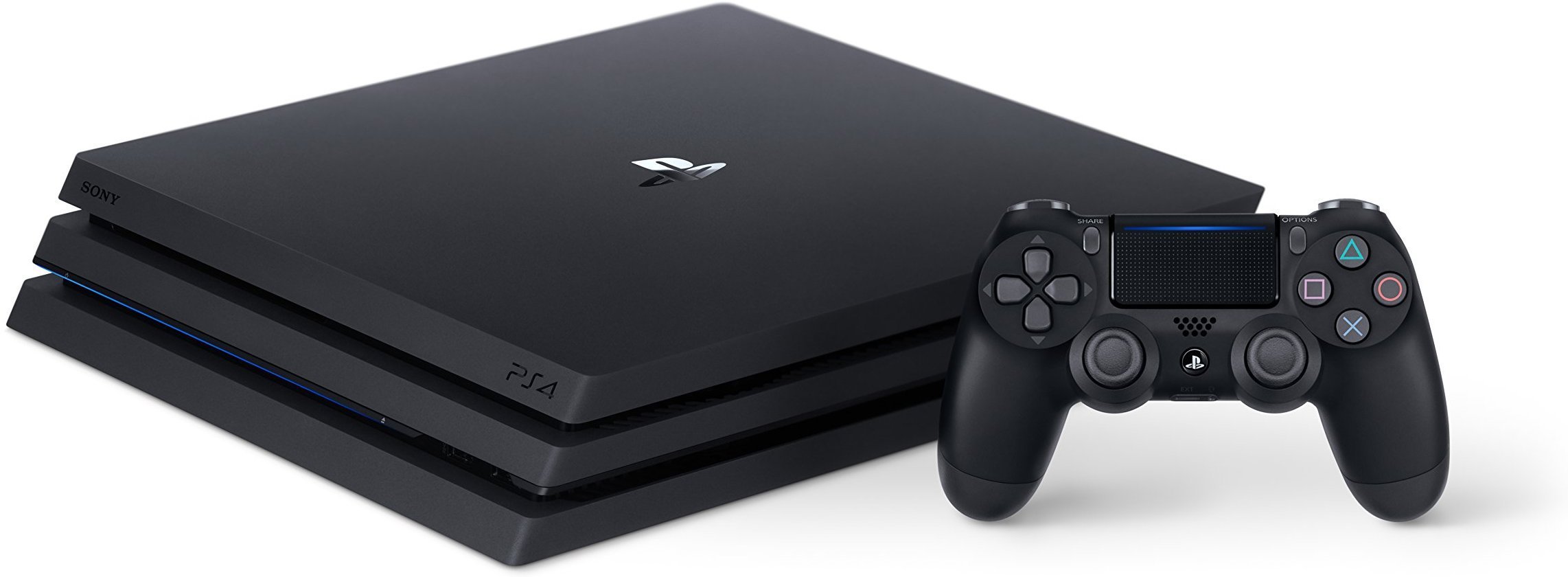
The PlayStation 4 Pro revolutionized console gaming when it launched as a mid-generation upgrade to the standard PS4. With twice the GPU power of the original PlayStation 4, the PS4 Pro delivers enhanced visuals and performance that breathe new life into your favorite games. The PS4 Pro outputs gameplay to 4K TVs and uses enhanced upscaling techniques to increase game resolutions from 1080p to 1440p, creating stunning clarity and more realistic visuals.
For gamers still using HD displays, the PS4 Pro offers significant benefits through its Boost Mode, which gives games access to increased power for smoother frame rates and shorter loading times. This performance boost is particularly noticeable in demanding titles and provides a more responsive gaming experience overall. The 1TB storage capacity also ensures you have plenty of room for your digital game library.
PlayStation 4 Pro Guide for 2026
The PlayStation 4 Pro, released in 2016, remains a capable console in 2026, especially for gamers who want a solid experience without upgrading to the latest PlayStation 5. This guide covers everything you need to optimize your PS4 Pro setup, including tips, tricks, and maintenance advice.
1. PS4 Pro Overview in 2026
- Hardware:
- Enhanced GPU and CPU compared to the base PS4.
- Supports 4K output (upscaled or native in some games), HDR, and improved frame rates.
- Software:
- Runs the latest PS4 system software (currently version 11.x+).
- Supports backward compatibility with most PS4 games.
- Relevance:
- Still supports online multiplayer, PS Plus, and streaming apps.
- Many new games still release PS4 versions, though increasingly fewer as developers focus on PS5.
2. Essential Setup Tips
Display and Video Settings
- Connect your PS4 Pro to a 4K HDR TV for the best visual experience.
- Enable HDR and 4K output in Settings > Sound and Screen > Video Output Settings.
- Use a high-quality HDMI 2.0 or better cable to ensure proper 4K HDR transmission.
Performance Mode vs. Resolution Mode
- Some games offer a choice between higher resolution or smoother frame rates.
- Choose Performance Mode for better frame rates (usually 60 FPS) or Resolution Mode for sharper visuals (usually 4K upscaled).
3. Maximize Storage
- The original PS4 Pro comes with a 1TB HDD, which can fill up quickly.
- Upgrade to a larger internal HDD or SSD (up to 8TB supported) for faster load times and more game storage.
- Alternatively, use an external USB 3.0 drive (minimum 250GB) for additional storage.
4. System Software Updates
- Keep your PS4 Pro updated with the latest system software for security patches, new features, and optimal performance.
- Enable automatic updates: Settings > System > Automatic Downloads > System Software Update Files.
5. Game Library and Backward Compatibility
- Many PS4 games remain highly playable and enjoyable in 2026.
- Take advantage of PS Plus Collection or PlayStation Now (or its successor services) for access to a large library of games.
- Use Game Boost feature for improved performance on select PS4 titles.
6. Controller Tips
- Use the DualShock 4 controller or compatible third-party controllers.
- Keep your controller firmware updated via the PS4 system settings.
- Consider a charging dock for convenience.
7. Streaming and Remote Play
- Stream games to your PC or mobile device using PS Remote Play.
- Use the PS4 Pro for streaming to platforms like Twitch or YouTube with built-in broadcasting features.
- Connect a good quality microphone and webcam for streaming.
8. Maintenance and Troubleshooting
- Keep your PS4 Pro well-ventilated to avoid overheating.
- Clean dust from vents periodically.
- Rebuild the database occasionally via Safe Mode to improve system responsiveness.
- If performance issues arise, consider reinstalling system software or restoring to factory settings (backup your data first).
9. Accessories to Consider
- External HDD or SSD for expanded storage.
- 4K HDR TV or monitor for best graphics.
- PS4 Pro vertical stand for better airflow.
- Gaming headset for immersive audio.
- Media remote for streaming apps.
10. Is It Time to Upgrade?
- PS4 Pro remains a viable option for budget-conscious gamers in 2026.
- If you want native 4K gaming, faster load times, and access to PS5 exclusives, consider upgrading to a PlayStation 5.
- PS4 Pro and PS5 share many games and online services, so you’re not missing out on multiplayer or community features.
Summary Table
| Feature | PS4 Pro (2026) |
|---|---|
| Max Resolution | 4K (upscaled/native in some games) |
| HDR Support | Yes |
| Storage Options | Internal HDD/SSD (up to 8TB), External USB 3.0 |
| Controller | DualShock 4, compatible third-party |
| Software Updates | Latest PS4 system software |
| Streaming | PS Remote Play, Twitch, YouTube |
| Best Use Case | Affordable 4K gaming, extensive PS4 library |
Key Takeaways
- The PS4 Pro offers twice the GPU power of the standard PS4, enabling 4K gaming and enhanced visuals on compatible TVs.
- Games run with smoother frame rates and shorter load times thanks to the Pro’s increased processing capabilities.
- The PlayStation 4 Pro remains a valuable part of the PlayStation ecosystem, especially for those who want better performance without upgrading to next-gen.
Technical Specifications and Enhancements
The PlayStation 4 Pro represents a significant upgrade over the standard PS4 model with substantial hardware improvements designed specifically for 4K gaming and enhanced visuals.
Hardware and Performance
The PS4 Pro features a considerably more powerful GPU than the standard PS4. While the original PS4 GPU delivers 1.84 teraflops of computing power, the Pro version more than doubles this to 4.2 teraflops. This upgrade comes from an AMD Radeon-based graphics chip with 2304 cores running at 911MHz, compared to the 1152 cores in the standard model.
The enhanced processing power allows games to run at higher resolutions and with more stable frame rates. Many games offer players options to prioritize either resolution or performance.
PS4 Pro maintains the same CPU architecture as the base model but with higher clock speeds to handle the increased workload. This combination of improved GPU and CPU performance creates a smoother gaming experience even in demanding titles.
Visual and Audio Technologies
The PS4 Pro’s primary selling point is its support for 4K resolution gaming. Games can render at resolutions ranging from 1080p to native 4K, depending on the title. Many games use clever upscaling techniques to deliver a near-4K experience.
HDR Support: The PS4 Pro fully supports High Dynamic Range (HDR) technology, enabling more realistic lighting, deeper blacks, and brighter whites in compatible games. This creates more lifelike colors and dramatically improves visual quality even on 1080p displays.
Games labeled as “PS4 Pro Enhanced” take special advantage of the console’s capabilities. These enhancements can include:
- Higher resolution textures
- More detailed environments
- Improved draw distances
- More stable frame rates
- Enhanced lighting effects
The visual improvements are most noticeable on 4K HDR-compatible televisions, though 1080p TV owners still benefit from supersampling and more stable performance.
Storage and Connectivity
The PS4 Pro ships with a 1TB hard drive as standard, providing ample space for game installations and downloads. The storage interface received an upgrade from 3 Gbit/s in the standard model to 6 Gbit/s in the Pro, allowing for faster data transfer speeds and reduced loading times.
For users needing more storage, the PS4 Pro supports external USB hard drives and the internal drive can be replaced with a larger capacity model or an SSD for even faster performance.
Connectivity options include:
- 3 USB ports (one more than the original PS4)
- Optical audio output
- HDMI 2.0 port (required for 4K output)
- Gigabit Ethernet
- 802.11ac Wi-Fi
The HDMI 2.0 port is crucial for delivering 4K content to compatible displays. The enhanced networking components help ensure smooth streaming of 4K content from services like Netflix and YouTube.
Gaming Experience and Content
The PS4 Pro delivers enhanced gaming experiences through improved performance and visual quality. It offers better framerates, higher resolutions, and specialized features that take advantage of modern display technologies.
PS4 Pro Exclusive Features
The PS4 Pro’s standout feature is its ability to display games at 4K resolution, creating sharper and more detailed visuals than the standard PS4. This enhanced resolution is achieved through a GPU that delivers twice the power of the base model.
Games labeled as “PS4 Pro Enhanced” are specially optimized to take advantage of the console’s extra power. These titles often offer players choices between different visual modes:
- Performance Mode: Prioritizes smoother framerates (60fps)
- Resolution Mode: Focuses on maximum visual clarity (up to 4K)
- Balanced Mode: Offers a mix of both
Load times are also noticeably reduced thanks to the Pro’s improved hardware. The 31% more powerful CPU helps games run more smoothly, especially during intense action sequences that would cause slowdown on the standard PS4.
PlayStation VR Integration
The PS4 Pro significantly improves the PlayStation VR experience through enhanced processing power. Virtual reality games run with more stable framerates, which helps reduce motion sickness and creates more immersive gameplay.
VR titles on PS4 Pro benefit from:
- Higher rendering resolutions
- More detailed textures
- Improved draw distances
- Reduced blur during movement
Games like Beat Saber and Astro Bot Rescue Mission show noticeable improvements when played on the Pro. The console’s extra power helps bridge the gap between the PSVR’s technical limitations and more expensive PC-based VR systems.
The Pro also handles tracking more precisely, making interactions in virtual environments feel more natural and responsive.
Media and Streaming
Beyond gaming, the PS4 Pro serves as a powerful entertainment hub with 4K streaming capabilities. Popular services like Netflix, YouTube, and Amazon Prime Video all support 4K content on the console.
The PS4 Pro includes:
- 4K video streaming support
- HDR compatibility for enhanced contrast
- Standard Blu-ray disc playback
While the PS4 Pro can play 4K streaming content, it’s worth noting that it doesn’t include a 4K Blu-ray drive. This means physical media plays at standard Blu-ray resolution, unlike the Xbox One X which supports 4K discs.
The PS4 Pro’s interface runs more smoothly when navigating between apps and games. This makes the overall experience of switching between gaming and media consumption more seamless and enjoyable.
Frequently Asked Questions
The PlayStation 4 Pro offers several upgrades over the standard PS4 model. Many gamers have questions about its features, performance, and availability.
What is the difference between the PlayStation 4 Pro and the PS4 Slim?
The PlayStation 4 Pro is larger and more powerful than the PS4 Slim. While the PS4 Slim is a smaller version of the original PS4, the Pro model offers enhanced graphics capabilities.
The Pro supports 4K resolution gaming and improved frame rates. It measures approximately 295×55×327 mm, making it slightly larger than the original PS4 and notably bigger than the Slim model.
The PS4 Pro also includes an extra USB port and improved Wi-Fi capabilities compared to the Slim version.
What features distinguish the PlayStation 4 Pro from earlier PlayStation 4 models?
The PS4 Pro features enhanced graphics processing power that allows for 4K gaming. This upgrade provides sharper visuals and more detailed environments in supported games.
Many games receive “Pro patches” that enable higher resolution, better frame rates, or enhanced visual effects. HDR (High Dynamic Range) support is also included, providing more vibrant colors and better contrast.
The Pro model comes with a 1TB hard drive as standard, while earlier models often shipped with smaller storage options.
What is the expected lifespan of the PlayStation 4 Pro in terms of support and updates?
Sony typically supports PlayStation consoles for several years after their successor launches. With the PS5 now available, the PS4 Pro still receives game releases and system updates.
Major game publishers continue developing cross-generation titles for both PS4 Pro and PS5. System software updates provide security patches and new features.
Most analysts expect the PS4 Pro to receive support through at least 2025, with game releases potentially continuing even longer.
How does the PlayStation 4 Pro performance compare to that of the PlayStation 5?
The PlayStation 5 significantly outperforms the PS4 Pro in all technical aspects. The PS5 features a much faster CPU, more powerful GPU, and SSD storage that dramatically reduces loading times.
While the PS4 Pro can display some games at 4K, it often uses techniques like checkerboard rendering rather than native 4K. The PS5 can run more games at true 4K with higher frame rates.
The PS5 also offers features not available on PS4 Pro, such as ray tracing, 3D audio, and the innovative DualSense controller.
Where can I find reliable information on the availability of the PlayStation 4 Pro for purchase?
The official PlayStation website provides up-to-date information on PS4 Pro availability. PlayStation Direct, Sony’s retail store, offers consoles directly to consumers.
Major electronics retailers like Best Buy, Amazon, and GameStop may still carry new or refurbished PS4 Pro consoles. Their websites typically show current stock levels.
Since the PS5’s release, new PS4 Pro production has decreased, making them harder to find. Used console marketplaces and auction sites are additional options.
What are the technical specifications of the PlayStation 4 Pro?
The PS4 Pro features an AMD Jaguar 8-core CPU clocked at 2.1GHz. It includes an AMD Radeon GPU with 4.2 teraflops of computing power.
The console comes with 8GB of GDDR5 RAM and typically includes a 1TB hard drive. Users can upgrade the internal storage or connect external USB drives.
The PS4 Pro has three USB 3.1 ports, one HDMI 2.0 port, optical audio output, and supports 802.11ac Wi-Fi and Bluetooth 4.0.





