
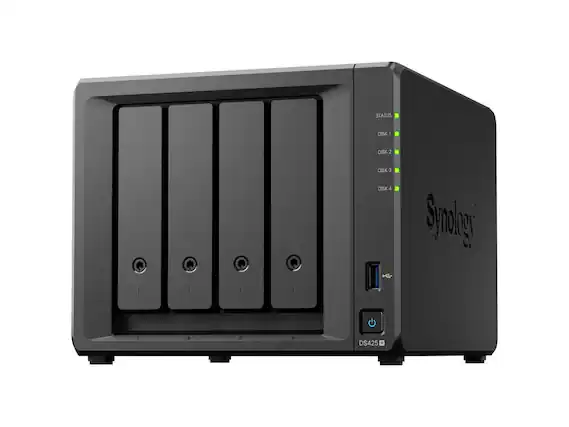
Looking for a way to store and share your digital files efficiently? A Network Attached Storage (NAS) device might be the solution you need. These handy devices connect to your home network and provide a central location for all your important files, photos, and media.
The QNAP TS-233 is currently the most recommended NAS for most home users in 2025, though Synology models like the DS920+ are also highly rated for their versatility. NAS devices serve as your personal home cloud, allowing you to access your files from anywhere and share them easily with family members. They’re especially useful for backing up important data and streaming media to different devices in your home.
When shopping for a home NAS, consider how much storage you’ll need and what features matter most to you. Some people just need basic file storage, while others want a device that can run applications, host websites, or serve as a media server. Brands like QNAP, Synology, and Buffalo offer reliable options at various price points to match your specific needs.
Best NAS for Home
A NAS (Network Attached Storage) is one of the best upgrades you can make for a modern home. It gives you:
- ✅ Private cloud storage
- ✅ Automatic backups
- ✅ Media streaming (Plex, Jellyfin)
- ✅ File sharing across devices
- ✅ Smart home and security camera storage
But choosing the right NAS depends on how you plan to use it.
This guide breaks down the best NAS devices for home users in 2026, plus a comparison table to help you choose quickly.
🏆 Best NAS for Home in 2026
1️⃣ Best Overall: Synology DS224+
Best for: Most households, backups, media streaming
- 2-bay NAS
- Intel processor
- 2GB RAM (expandable)
- Excellent DSM software
- Supports Plex, Docker, cloud sync
Why it’s great: Synology’s DSM operating system is the easiest and most polished for beginners. It’s reliable, quiet, and powerful enough for streaming and backups.
✅ Perfect balance of performance and simplicity.
2️⃣ Best for Media Streaming: QNAP TS-264
Best for: Plex users, 4K streaming
- 2-bay NAS
- Intel quad-core CPU
- 8GB RAM (expandable)
- 2.5GbE networking
- HDMI output
Why it stands out: Stronger hardware than most 2-bay NAS devices. Ideal for Plex with hardware transcoding and higher-speed networking.
✅ Great for heavy media users.
3️⃣ Best Budget NAS: Synology DS223
Best for: Simple backups and file storage
- 2-bay NAS
- ARM-based processor
- 2GB RAM
- Quiet and energy efficient
Why choose it: If you just want automatic backups, Time Machine support, and file storage — this is a reliable budget-friendly option.
✅ Affordable and easy to use.
4️⃣ Best 4-Bay NAS for Growth: Synology DS423+
Best for: Expanding storage, RAID flexibility
- 4 drive bays
- Intel CPU
- Expandable RAM
- NVMe cache support
Why upgrade to 4-bay?
- More storage capacity
- Better RAID protection
- Expand over time
✅ Ideal for families or power users.
5️⃣ Best for Power Users: QNAP TS-464
Best for: Virtual machines, containers, heavy workloads
- 4-bay NAS
- Intel quad-core CPU
- 2.5GbE networking
- Expandable RAM
- PCIe expansion slot
If you want to run:
- Virtual machines
- Docker containers
- Advanced media servers
- Home lab setups
✅ This is a strong performance choice.
📊 NAS Comparison Table (2026)
| Model | Bays | CPU Type | RAM | Best For | Network Speed |
|---|---|---|---|---|---|
| Synology DS224+ | 2 | Intel | 2GB (expandable) | Most homes | 1GbE |
| QNAP TS-264 | 2 | Intel Quad-Core | 8GB (expandable) | Plex / 4K streaming | 2.5GbE |
| Synology DS223 | 2 | ARM | 2GB | Budget backups | 1GbE |
| Synology DS423+ | 4 | Intel | 2GB (expandable) | Growing families | 1GbE |
| QNAP TS-464 | 4 | Intel Quad-Core | 4GB+ (expandable) | Power users | 2.5GbE |
💾 How Many Bays Do You Need?
2-Bay NAS
- Good for most homes
- Supports RAID 1 (mirroring)
- Affordable
4-Bay NAS
- Better long-term expansion
- More RAID options (RAID 5/6)
- Higher capacity
If you plan to grow your storage, start with 4 bays.
🧠 What to Consider Before Buying
✅ 1. Storage Needs
Photos and documents → 4–8TB
4K movies → 16TB+
Security cameras → 24TB+
✅ 2. RAID Protection
- RAID 1 = mirror protection
- RAID 5 = better storage efficiency
- RAID is NOT a backup (always have external/cloud backup)
✅ 3. Network Speed
- 1GbE is fine for most homes
- 2.5GbE is better for large file transfers and 4K streaming
✅ 4. Noise & Power
Most home NAS devices are quiet, but check reviews if placing it in a bedroom or office.
🔒 Why a NAS Is Better Than an External Drive
| External Drive | NAS |
|---|---|
| Direct connection only | Network access from all devices |
| No redundancy | RAID protection |
| No apps | Media servers, backups, cloud sync |
| Single user | Multi-user support |
✅ Final Recommendation
For most home users in 2026:
🏆 Best Overall: Synology DS224+
💰 Best Budget: Synology DS223
🎬 Best for Media: QNAP TS-264
📦 Best for Growth: Synology DS423+
Key Takeaways
- A NAS provides centralized storage that works like a personal cloud for accessing and sharing files throughout your home.
- The best home NAS devices in 2025 come from brands like QNAP and Synology, with models designed for different user needs and budgets.
- When choosing a NAS, consider storage capacity, ease of use, and additional features like media streaming capabilities.
Understanding NAS and Its Benefits for Home Use
Network Attached Storage (NAS) devices offer home users a powerful way to store, protect, and share data across multiple devices. These systems provide local storage solutions that combine reliability with accessibility, making them increasingly popular alternatives to cloud storage.
Defining NAS and Network Attached Storage
NAS stands for Network Attached Storage—a dedicated storage device that connects to your home network. Unlike external hard drives that attach to a single computer, a NAS connects directly to your router, making files accessible to all connected devices in your home.
Most NAS devices feature multiple drive bays that can hold hard drives or SSDs. Popular models like the QNAP TS-233 and TS-264-8G offer varying capacities to meet different storage needs.
A NAS functions as a mini-server without the complexity of setting one up yourself. It runs its own operating system with an easy-to-use interface, eliminating the need for command-line operations or manual port configurations.
Comparing NAS with Cloud Storage Solutions
NAS systems differ from cloud storage in several key ways:
Ownership and Control:
- NAS: You own the hardware and data stays in your home
- Cloud: A company stores your data in remote data centers
Cost Structure:
- NAS: One-time purchase with optional upgrades
- Cloud: Monthly or annual subscription fees that increase with usage
Privacy Considerations:
- NAS: Complete privacy with no third-party access
- Cloud: Potential privacy concerns with data stored on others’ servers
NAS provides faster access speeds for large files compared to cloud solutions, especially when working with media files like videos or photos.
Advantages of Using NAS at Home
A home NAS system offers several compelling benefits:
Centralized Storage: All your important files, photos, videos, and documents live in one place, accessible from any device on your network.
Data Protection: Most NAS devices support RAID configurations, providing redundancy if a drive fails. This means your precious family photos and documents remain safe.
Media Streaming: NAS systems can stream movies, music, and photos to smart TVs, phones, and tablets throughout your home.
Private Cloud: Many NAS devices offer secure remote access, letting you reach your files when away from home without monthly fees.
Expandability: As your storage needs grow, you can easily upgrade by adding larger drives or expanding to additional bays in compatible systems.
Key Features to Look for in a Home NAS
When shopping for a home NAS, several critical features will determine both performance and reliability. The right combination of storage media, data protection, connectivity options, and power efficiency creates a system that meets your specific needs.
Hard Drive vs SSD: Storage Considerations
Traditional hard disk drives (HDDs) remain the most cost-effective option for NAS systems, offering large capacities at reasonable prices. A typical 4TB HDD costs significantly less than an equivalent SSD while providing ample storage for family photos, videos, and documents.
SSDs offer compelling advantages despite higher costs. SATA SSDs deliver faster access times and better reliability with no moving parts. For premium performance, some newer NAS systems support NVMe SSDs, which provide even faster data transfer rates – perfect for media streaming and quick backups.
Many users opt for a hybrid approach. This might include using SSDs for frequently accessed files or as cache drives to speed up overall performance, while relying on HDDs for bulk storage of media libraries and archives.
When selecting drives, check compatibility with your NAS manufacturer’s guidelines. Most reputable brands publish compatibility lists to ensure optimal performance.
Importance of RAID Support and Types
RAID technology is essential for protecting your valuable data. Different RAID configurations offer varying levels of protection and performance benefits.
RAID 1 mirrors data across two or more drives, creating perfect duplicates. If one drive fails, your data remains safe on the other drive. This configuration is ideal for critical family photos and important documents but cuts your total available storage in half.
RAID 0 focuses on performance by splitting data across multiple drives. While this provides faster read/write speeds, it offers no redundancy – if one drive fails, all data is lost. This option is better for temporary storage or when speed is the priority.
For larger multi-bay NAS systems, RAID 5 or RAID 6 configurations balance storage efficiency with data protection by using parity information spread across drives.
The best NAS devices allow you to easily switch between RAID types as your needs change without complex technical knowledge.
Connectivity: From SATA Ports to Gigabit Ethernet
A good NAS system provides multiple connectivity options. Internally, look for sufficient SATA ports to accommodate your desired number of drives. Some high-end models include M.2 slots for NVMe SSDs.
External connectivity is crucial for accessing your data. Gigabit Ethernet is the standard minimum, allowing data transfer at up to 125MB/s. For households with multiple heavy users, look for models with dual Gigabit Ethernet ports that can be aggregated for improved performance.
USB ports are equally important for connecting external drives, either for expanding storage or performing backups of the NAS itself. USB 3.0 or higher ensures fast transfer speeds when needed.
Some premium models now offer 2.5GbE or even 10GbE networking options, which can be beneficial if your home network supports these faster standards and you regularly transfer large files.
Power Consumption and Performance Metrics
Power consumption is an often overlooked but important consideration for a device that runs 24/7. Energy-efficient NAS systems typically consume between 5-25 watts when idle and 20-50 watts under load, depending on the number of drives and processing demands.
Look for NAS devices with scheduled power on/off features and drive hibernation to reduce consumption during periods of inactivity. These features can significantly reduce your electricity costs over the life of the device.
The CPU and RAM specifications directly impact performance for tasks beyond simple file storage. For media streaming, photo indexing, or running multiple apps, choose a NAS with at least a quad-core processor and 2GB of RAM.
Many NAS systems provide detailed performance monitoring tools to track resource usage, helping you optimize settings and determine when an upgrade might be necessary.
Top NAS Solutions and Brands for Home Environments
Several brands stand out in the home NAS market, each offering unique features and capabilities to meet different storage needs. These solutions range from user-friendly systems for beginners to advanced options for tech enthusiasts.
Synology: A Leader in NAS Technology
Synology has established itself as a frontrunner in the home NAS market. The DS220+ model is particularly popular for home users, offering a balance of performance and affordability.
This brand is known for its polished, intuitive DSM operating system that makes file management accessible even for tech novices. Synology’s products excel at media streaming, photo management, and comprehensive backup solutions.
The DS1522+ offers more expansion options for growing storage needs. Synology also provides robust mobile apps for accessing files remotely and backing up smartphones automatically.
Their security features include encrypted folders and automatic security updates. For many home users, Synology represents the gold standard in reliability and software experience.
Qnap and Terramaster
QNAP offers versatile NAS solutions with powerful hardware specifications. The TS-233 provides excellent value for home users who need reliable storage without breaking the bank.
QNAP’s QTS operating system includes apps for media streaming, surveillance, and virtualization. Their devices typically feature HDMI ports, making them suitable for direct connection to TVs as media centers.
TerraMaster has emerged as a budget-friendly alternative. The F4-210 model offers four drive bays at a competitive price point. TerraMaster units run TOS, a straightforward operating system that covers essential NAS functions.
Both brands support Docker containers, allowing users to run additional applications. They provide regular firmware updates to maintain security and add new features, making them solid options for home environments.
Buffalo and Western Digital Options
Buffalo NAS devices focus on simplicity and reliability. Their LinkStation series aims at users who want plug-and-play functionality without complex setup procedures.
These devices offer automatic backup capabilities and secure remote access. Buffalo’s strength lies in straightforward operation rather than advanced features.
Western Digital’s My Cloud EX2 Ultra stands out as a consumer-friendly option. It combines easy setup with WD’s reputation for reliable hard drives. The My Cloud interface is designed with beginners in mind.
WD devices excel at basic file sharing and backup tasks. They typically come in smaller configurations (2-4 bays) suitable for apartments and small homes. Their power efficiency makes them ideal for 24/7 operation without significant electricity costs.
DIY NAS: FreeNAS and OpenMediaVault
For tech-savvy users, building a DIY NAS offers maximum customization. TrueNAS (formerly FreeNAS) is a powerful, FreeBSD-based solution that supports advanced features like the ZFS file system for data integrity.
DIY options require more technical knowledge but provide greater hardware flexibility. Users can repurpose old computers or select specific components based on their needs.
OpenMediaVault offers a more approachable Debian Linux-based alternative. It features a web interface for management and supports plugins to extend functionality.
The DIY approach can be more cost-effective for large storage requirements. Users can start small and expand as needed. However, these solutions require more maintenance and troubleshooting compared to commercial NAS products.
Building your own system provides valuable learning opportunities about networking and storage technologies.
Setting Up and Securing Your Home NAS
Setting up a home NAS requires careful planning for both initial configuration and long-term security. The right setup ensures your data remains protected and accessible when you need it.
Installation and Configuration Guide
Most NAS devices offer a straightforward setup process. After unpacking your NAS, connect it to your router using an ethernet cable and power it on. The device will typically obtain an IP address automatically through DHCP.
Access the setup wizard by typing the device’s IP address in your web browser. For popular brands like Synology or QNAP, you can use their finder tools to locate your NAS on the network.
During initial setup, create a strong admin password and avoid using the default credentials. This is your first line of defense against unauthorized access.
Consider setting up user accounts with appropriate permissions. This limits access to sensitive data and prevents accidental deletions.
Enable encryption for sensitive files. While this may slightly reduce performance, it significantly enhances security if your device is ever stolen.
Data Protection and RAID Configurations
RAID (Redundant Array of Independent Disks) configurations are essential for data protection. For home users, several options exist:
| RAID Level | Drives Required | Protection Level | Best For |
|---|---|---|---|
| RAID 1 | 2 minimum | Mirror | Basic protection |
| RAID 5 | 3 minimum | Single drive failure | Good balance |
| RAID 10 | 4 minimum | Multiple drive failures | Maximum protection |
| RAID-Z/Z2 | 3-6 drives | Advanced protection | ZFS systems |
RAID is not a backup solution but protects against drive failure. Seagate IronWolf drives are designed specifically for NAS use with higher durability ratings than standard drives.
Consider your storage needs when choosing a configuration. JBOD (Just a Bunch of Disks) offers maximum capacity but no redundancy.
Maintaining and Updating Your NAS System
Regular maintenance ensures your NAS remains reliable. Set up automatic firmware updates to protect against security vulnerabilities. Most NAS operating systems offer this feature in their control panels.
Enable S.M.A.R.T. monitoring to detect early signs of drive failure. This technology tracks various drive health metrics and can alert you before catastrophic failure occurs.
Schedule regular disk checks to maintain file system integrity. These scans can identify and repair potential issues before they cause data loss.
Implement a proper backup strategy beyond your NAS. The 3-2-1 backup rule recommends three copies of data on two different media types with one copy offsite.
Clean your NAS periodically to prevent dust buildup. Ensure proper ventilation around the device to avoid overheating, which can shorten drive lifespan.
Frequently Asked Questions
Choosing the right NAS for your home can be complex. These questions help address common concerns about features, performance, and brands to consider for your specific needs.
What factors should be considered when selecting a NAS for home use?
Storage capacity is a primary consideration when selecting a NAS. Determine how much data you need to store now and in the future.
The number of drive bays affects expandability. More bays allow for greater storage capacity and better redundancy options.
Processing power and RAM are crucial if you plan to run multiple applications simultaneously. Media streaming, file conversion, and surveillance systems require more powerful hardware.
Consider the backup options available. The 3-2-1 backup rule mentioned in search results suggests having three copies of data on two different media with one copy off-site.
User interface and ease of setup matter, especially for home users without IT expertise. Synology and QNAP are known for user-friendly interfaces.
How does a NAS for home media serving differ from one for small business use?
Home media NAS systems prioritize streaming performance and media organization. They often include specialized apps for managing photos, videos, and music.
Business NAS devices focus more on security features, user access controls, and data protection. They may offer better encryption and authentication options.
Connection speed requirements differ. Home systems typically connect to fewer devices simultaneously, while business systems need to handle multiple concurrent users.
Power consumption is usually lower for home NAS devices. Business models may offer more redundancy features like dual power supplies.
Home NAS systems often emphasize compatibility with consumer devices like smart TVs, game consoles, and media players.
What are the most recommended NAS brands for setting up a home media server?
Synology consistently ranks high for home media servers. Their DSM operating system is user-friendly and they offer excellent multimedia capabilities.
QNAP is another top recommendation, with the QNAP TS-264-8G specifically mentioned in search results as “the best home NAS” by The New York Times.
ASUSTOR provides good value with strong media server capabilities and intuitive interfaces for home users.
TerraMaster offers budget-friendly options that still provide solid performance for basic home media serving needs.
Western Digital’s My Cloud series provides simple setup and operation for users new to NAS devices.
What specifications are important for a NAS to perform well with Plex?
CPU power is critical for Plex transcoding. Look for Intel Core or AMD Ryzen processors if you plan to transcode multiple high-definition streams simultaneously.
RAM affects overall performance. 4GB is a minimum for basic Plex usage, while 8GB or more is better for multiple users or 4K content.
Network connectivity matters for streaming speed. Look for a NAS with at least a Gigabit Ethernet port, with 2.5GbE or 10GbE being ideal for 4K content.
Hardware transcoding support can significantly improve Plex performance. Some NAS devices include dedicated graphics processing for faster transcoding.
According to search results, Synology devices “do Plex very well,” making them a recommended choice for media streaming applications.
Are there any significant benefits of choosing a QNAP or Synology NAS for home applications?
Both brands offer robust app ecosystems. Synology’s Package Center and QNAP’s App Center provide access to hundreds of applications that extend functionality.
User interfaces are intuitive and well-designed. Synology’s DSM and QNAP’s QTS operating systems are considered among the most user-friendly in the market.
Reliability is a key strength. Both manufacturers have established reputations for building durable hardware with good long-term support.
Remote access features are well-implemented. Synology’s QuickConnect is mentioned in search results as a “secur-ish way to remotely access” your data.
Regular software updates provide new features and security patches, extending the useful life of the device beyond what custom-built solutions might offer.
How can performance and reliability of NAS storage for home be assessed before purchase?
Read professional reviews from reputable technology websites. The New York Times comparison mentioned in the search results tested multiple devices to find the best option.
Check user reviews on retail sites, focusing on long-term reliability reports rather than initial impressions.
Look for benchmark data that matches your intended use case. If you plan to stream 4K video, find performance tests specific to that task.
Consider the warranty period and customer support quality. Longer warranties often indicate manufacturer confidence in their product.
Examine the RAID options available. Different RAID levels offer various balances between storage efficiency, performance, and data protection.
Testing drive failure scenarios can be valuable. Some higher-end NAS devices can simulate drive failures to show how recovery works.





